WebAssembly has a reputation problem. Most developers still think of it as a way to run C++ in a browser, or as a demo technology that never quite arrived.
That picture is out of date. In 2026, the core specification is at version 3.0 as a W3C Candidate Recommendation, WASI 0.3 shipped with native async support in June, and WebAssembly is running in production on CDNs, in plugin systems, in databases, and in some of the heaviest web apps people use every day.
But the hype has also produced bad advice. People port a small function to WebAssembly, benchmark it, find it slower than JavaScript, and conclude that the technology is useless. Or they port a large app, ship a 4 MB binary, and wonder why the page takes longer to load.
Both outcomes come from the same misunderstanding. WebAssembly is not automatically faster than JavaScript. It is a different execution target with a very specific cost model. Once you understand that cost model, the decisions become obvious.
This post is about where WebAssembly actually wins in 2026, where it quietly loses, and how to tell the difference before you spend a week on a port.
1. What WebAssembly Actually Is
WebAssembly is a binary instruction format. It is not a programming language. You write Rust, C, C++, Zig, Go, or another language, compile it to a .wasm file, and run that file in a runtime.
The runtime can be a browser, a server process like Wasmtime, an edge platform like Fastly Compute, or a small embedded device. The same binary can run in all of them, which is the portability promise.
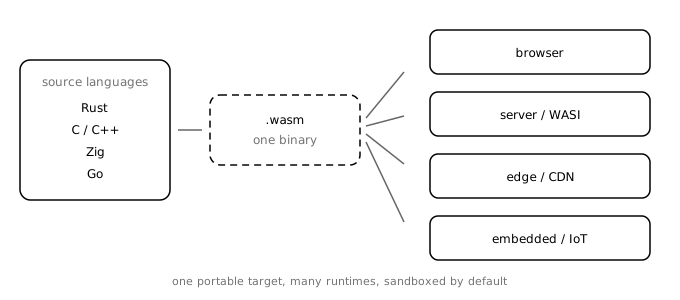
Three properties matter more than raw speed:
It is sandboxed. A WebAssembly module cannot reach outside its linear memory unless the host gives it a capability. It cannot open a file, open a socket, or read a cookie on its own. The host decides what exists.
It is deterministic in its memory model. The module sees a flat byte array and its own functions. No pointers into the host, no shared objects, no prototype chain to worry about.
It is a compilation target, not a framework. There is no WebAssembly standard library for the web. You bring your language’s runtime, or you write without one. That is why binary size becomes your problem.
That last point is where most first attempts go wrong. A language runtime that feels free on a server can add hundreds of kilobytes before you write a line of useful code.
2. The Boundary Is the Whole Story
JavaScript and WebAssembly do not share objects. When JavaScript calls a WebAssembly function, the arguments have to be translated into values the module understands. When the module returns, the results have to come back.
For numbers, this is cheap. For strings, arrays, and objects, it usually means copying bytes into the module’s memory and copying results back out.
That cost is fine if you cross the boundary once. It is fatal if you cross it a million times.
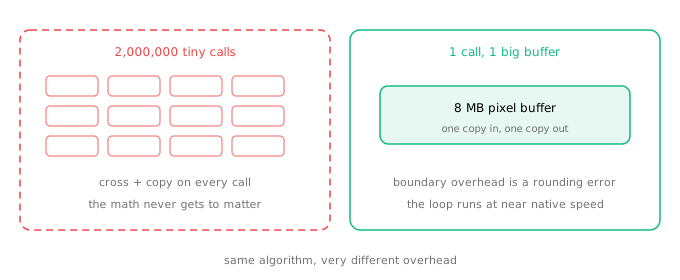
Imagine you have a 1920 by 1080 image. That is about 2 million pixels. If you expose a function called processPixel and call it from JavaScript in a loop, you pay the boundary cost 2 million times. Any speedup inside the function disappears into call overhead and copying.
If instead you expose grayscale(pixels) and pass the entire image buffer once, you pay the boundary cost twice: once going in, once coming out. The loop runs inside WebAssembly at near native speed.
The rule is simple:
- One call with a large payload: WebAssembly usually wins.
- Many calls with small payloads: stay in JavaScript.
- No real computation, just orchestration: stay in JavaScript.
This is not a small optimization detail. It is the difference between a successful port and a failed one. A team that ports a library but keeps the per-item API will conclude WebAssembly is slow. The technology is fine. The interface was wrong.
3. Where It Actually Wins
The strongest use cases share a shape: heavy computation over a large buffer, or untrusted code that must run safely.
Heavy browser applications. Figma moved performance-critical parts of its editor to WebAssembly and reported a roughly 3x improvement in load time. Video editors, CAD tools, PDF readers, image editors, and code editors follow the same pattern. The work is CPU-bound and operates on big buffers.
Codecs and media. Decoding video, resizing images, encoding audio, and processing large files are natural fits. The data is already a byte buffer, and the algorithms are loops over that buffer.
Existing native libraries. If a mature C or Rust library already does the job, compiling it to WebAssembly is often cheaper than rewriting it in JavaScript. This is how many browser-based tools get desktop-class features without a desktop install.
Plugin systems and multi-tenant code. This is the server-side story. If you need to run code written by someone else, WebAssembly gives you a sandbox with explicit capabilities. Shopify Functions, Envoy filters, and several edge platforms use this model. You can run untrusted code without giving it your filesystem or your network.
Edge compute. A small module can start quickly and run close to the user. That matters for request transformations, image processing, and policy checks. It does not matter much for a CRUD API that spends its time waiting on a database.
Embedded and portable runtimes. A single binary that runs on a server, an edge node, and a microcontroller class device is useful when you cannot ship a different build for every target.
Notice what is not on the list: replacing your frontend framework, rewriting a typical CRUD app, or moving every utility function out of JavaScript. WebAssembly is a specialized tool, not a general-purpose upgrade.
4. A Small Real Example
Here is the image-processing case in its simplest form. The Rust side exposes one function that takes the whole pixel buffer.
use wasm_bindgen::prelude::*;

#[wasm_bindgen]
pub fn grayscale(pixels: &mut [u8]) {
    for px in pixels.chunks_exact_mut(4) {
        let r = px[0] as u32;
        let g = px[1] as u32;
        let b = px[2] as u32;
        let y = (r * 299 + g * 587 + b * 114) / 1000;

        px[0] = y as u8;
        px[1] = y as u8;
        px[2] = y as u8;
    }
}
The JavaScript side decodes the image, passes the buffer once, and writes the result back.
import init, { grayscale } from "./pkg/image_wasm.js";

await init();

export function applyGrayscale(canvas) {
  const ctx = canvas.getContext("2d");
  const image = ctx.getImageData(0, 0, canvas.width, canvas.height);

  // One view over the pixel bytes, one call into Wasm.
  const pixels = new Uint8Array(image.data.buffer);
  grayscale(pixels);

  image.data.set(pixels);
  ctx.putImageData(image, 0, 0);
}
Two details matter.
First, the function takes &mut [u8], which wasm-bindgen turns into a typed array view. The data is copied into WebAssembly memory before the call and copied back after it. For an 8 megapixel image, that is roughly 32 MB in each direction. That sounds like a lot, but it is two copies for a loop over 8 million pixels. It is usually a good trade.
Second, this is still not automatically faster than JavaScript. V8 is extremely good at a tight pixel loop. For a small image or a trivial filter, the JavaScript version may win because it avoids the copies entirely. The win appears when the computation per pixel is expensive, the image is large, or both.
This is why benchmarking before porting is not optional. Measure the JavaScript version, measure the WebAssembly version, and measure on a low-end phone, not just your laptop. Use performance.now() around the whole operation, warm up the code first, and compare p95 rather than a single run.
5. The Server Side Got Interesting
For years, server-side WebAssembly was a promise without a stable foundation. That changed in 2026.
WASI 0.3 shipped in June with native async support. Streams and futures are now part of the Component Model’s canonical ABI, and the host manages one event loop instead of every component bringing its own. That makes composition practical: a Rust component and a Go component can talk through typed interfaces without either one knowing how the other is implemented.
The Component Model is the other half. It defines a type system, an interface definition language called WIT, and a standard way to pass typed values across component boundaries.
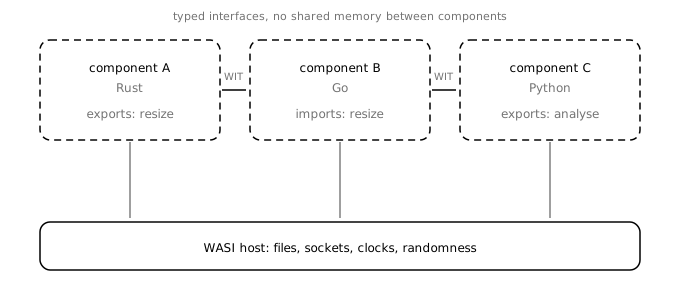
In practice, this is how you build a plugin system that does not depend on the host language. The host exposes a WIT interface. Each plugin is a component that imports it. The runtime enforces the boundary and the capabilities. A plugin written in Rust can be replaced by one written in Go without changing the host.
The ecosystem is still uneven. WASI 0.3 is current, WASI 0.2 is stable but superseded, and WASI 0.1 is legacy. Wasmtime 46 runs 0.3 components by default, Rust has wasip3 bindings, and jco has an experimental 0.3 shim for Node.js. Most other toolchains still target 0.2.
Component Model 1.0 is the next milestone, not a shipped fact. The Bytecode Alliance has described a non-breaking path: a lazy ABI lands as an opt-in in a 0.3.x release, becomes the default at 1.0, and an adapter converts older components. Until then, check your toolchain’s version before designing around a feature.
6. What It Costs
A balanced post about WebAssembly has to spend real time on the costs, because they are what sink projects.
Binary size. A Rust module starts larger than you expect. The standard library, panic machinery, and formatting code add up. Edge platforms and browsers have limits. Getting a 2 MB module down to a few hundred kilobytes takes deliberate work: opt-level = "z", LTO, codegen-units = 1, panic = "abort", and wasm-opt -Oz. That is a build pipeline, not a checkbox.
Toolchain complexity. You now have a second language, a second build step, generated bindings, and a compilation target that behaves differently from your usual environment. Someone on the team has to own that. If nobody does, the Wasm module becomes a black box that nobody wants to touch.
No direct DOM access. WebAssembly cannot touch the DOM. Every interaction goes through JavaScript. That is fine for a compute kernel and painful for a UI framework. Do not port your rendering layer unless you have a very specific reason.
Threads and system APIs are still maturing. WASI threads are progressing, but support varies by runtime and toolchain. If your workload needs heavy shared-memory threading, native code is still the safer default.
Debugging is harder. Source maps and DWARF support have improved, but stepping through a Wasm module is not yet as smooth as debugging JavaScript. You will spend more time on build configuration and less on the actual bug.
Version churn. WASI 0.1, 0.2, and 0.3 coexist in the wild. A tutorial from 2024 may not match the runtime you install in 2026. Pin your versions and read the release notes.
Security is not automatic. The sandbox protects the host from the module, but it does not protect you from bad input inside the module. You still validate data, cap memory, set CPU limits, and grant only the capabilities the module actually needs. A sandbox with a filesystem handle is only as safe as the code you gave the handle to.
7. A Decision Guide
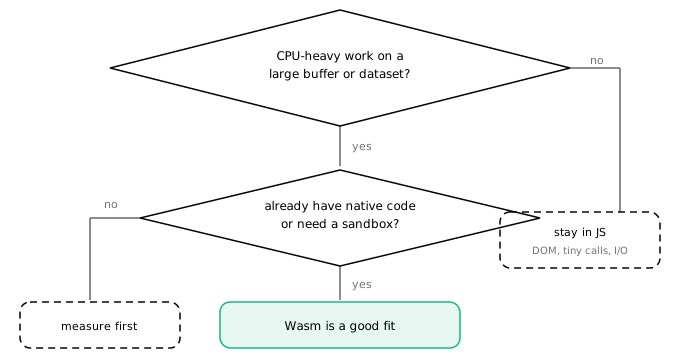
Before you write any Rust, answer these questions honestly.
Is the work CPU-heavy? If the function spends its time waiting on the network or the database, WebAssembly will not help. Most backend endpoints are I/O-bound. Optimize the query, not the runtime.
Does the data cross the boundary in large chunks? One call with a big buffer is a good sign. A per-item or per-pixel API is a warning sign. Design the interface so each call does as much work as possible.
Do you already have native code? If a maintained C, C++, Rust, or Zig library does what you need, compiling it is often the cheapest path. Rewriting it in JavaScript to avoid a build step may cost more in the long run.
Do you need a sandbox? Running third-party plugins or user-supplied logic is one of the strongest reasons to choose WebAssembly. The capability model is the feature, not the speed.
Can someone maintain the toolchain? If the answer is no, the module will rot. A working demo is not the same as a maintained dependency.
If you answer yes to the first two and yes to at least one of the next three, WebAssembly is worth a prototype. If not, stay where you are and measure again later.
8. What I Would Use It For
My own pixel tools do their image work in JavaScript today. For the image sizes they handle, that is the right call. The loops are simple, the images are small, and the browser’s JavaScript engine is already fast. Adding a Rust toolchain and a Wasm build would make the project harder to maintain for no measurable gain.
If I added a mode for very large images, or a filter that does real per-pixel work, I would move that loop into WebAssembly and keep the UI in JavaScript. Same for a bulk media converter or a client-side video tool.
On the server, I would reach for WebAssembly when I need to run code I do not trust. A plugin system for user-defined transformations is a much better fit than a general API backend. The sandbox is the product there.
That is the honest state of WebAssembly in 2026. It is not the future of all software, and it is not a failed experiment. It is a mature compilation target with a specific shape: big buffers, heavy loops, untrusted code, and portability across runtimes.
Use it when the shape fits. Measure before you port. Design the boundary before you optimize the loop. And do not let a bad interface convince you that the technology is slow.
Sign in with GitHub to join the conversation.